Who Needs a LoRA?
How to use prompt restraint - not fine-tuning - to make a frontier image model preserve a hand-drawn art style across edits.
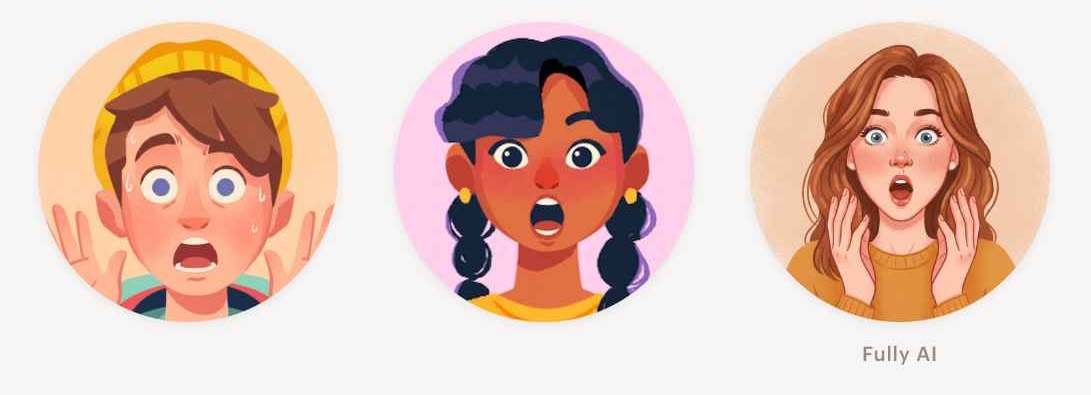
Which of these images were hand drawn?
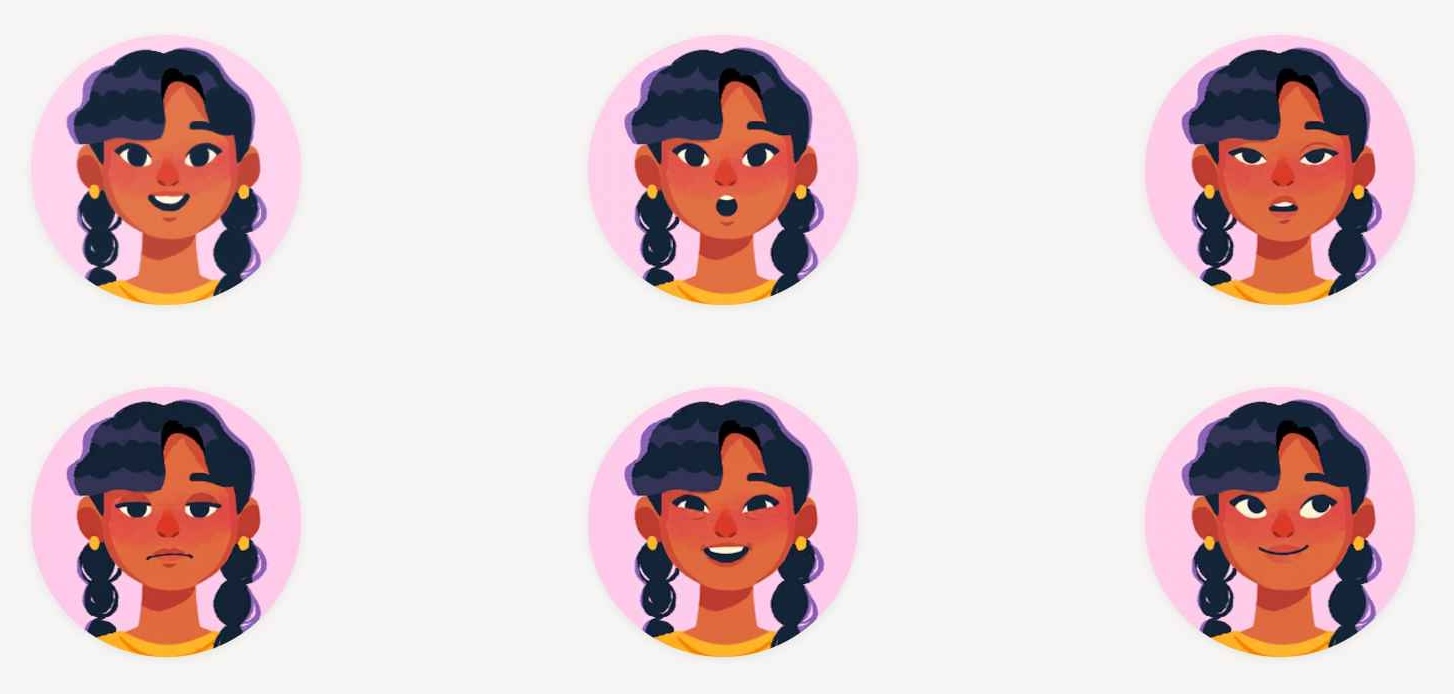
Only the top-left one.
The other five were edited from that single hand-drawn original using a frontier image model and a carefully restrained prompt - no LoRA, no ControlNet, no inpainting masks. This post is about how we got there: what didn’t work, what did, and the three principles that fell out of it.
The problem
At Stile we use hand-drawn character illustrations all over our science lessons - most prominently in character conversation widgets, where two characters trade speech bubbles to explain a concept. Each one ships with a single facial expression: a warm, neutral smile. So whether a character is delivering good news, expressing alarm, or asking a hesitant question, the face never changes. But re-drawing every character in every emotion is too expensive and time-consuming for our small in-house design team.
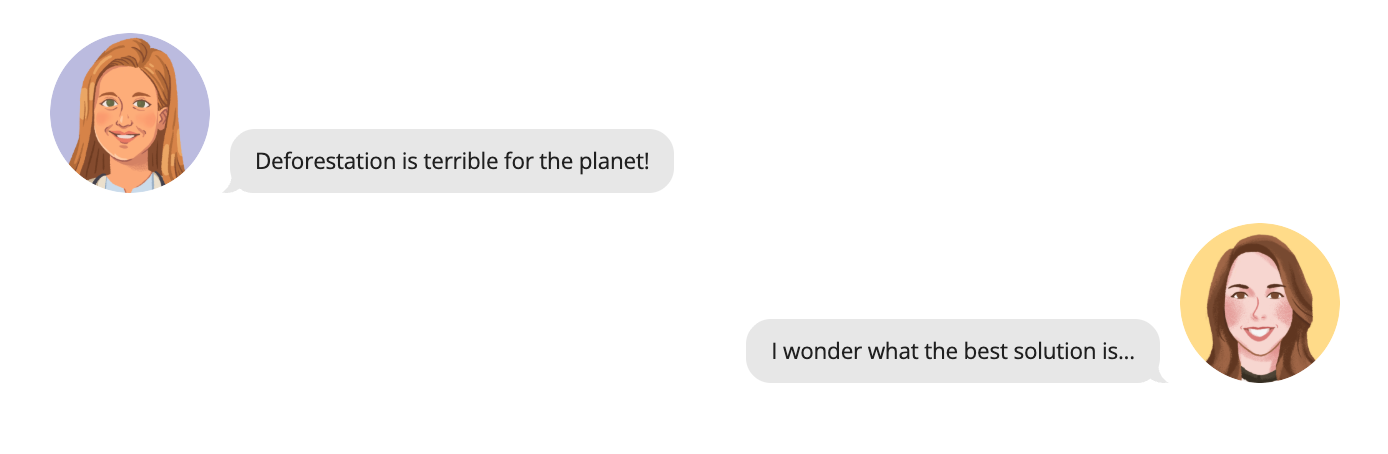
We wanted to take an existing illustration and generate emotion-matched variants - surprised, concerned, excited, sad - that look like the same artist drew them. Cheaply, automatically, and without destroying the stylistic features of the original. The sources are small - 256×256 - which constrains how much fine detail the model can read from the reference, and matters more downstream than it sounds.
The model we used for this is Nano Banana 2 (gemini-3.1-flash-image-preview) - a multimodal model from Google with a strong image-editing mode. The API takes a text prompt and any number of reference images and returns one generated image; everything that follows is about coaxing it into the right behaviour.
Why not a LoRA?
The default move for “make this model match my style” is a LoRA (Low-Rank Adaptation) - a small set of extra weights you train on a handful of examples and bind to a trigger word. At inference time, the LoRA nudges outputs toward your aesthetic. LoRAs are cheap to train and don’t need many training examples to produce a high-quality output - there are plenty of online examples showing great results with as few as 15 training images.
A LoRA approach here would mean:
- Collect a dataset of our hand-drawn illustrations
- Train a LoRA to associate a trigger word (e.g. “STILE”) with the style
- At generation time, pass the original illustration with a prompt like “using STILE illustration, give this character a surprised expression”
We do have a reasonable bank of Stile-style portraits to teach a LoRA the look - roughly 25 scientist character faces, all front-facing and drawn in our house aesthetic:

But every single one of those wears a neutral smile. We have zero examples of any of these characters expressing a different emotion. So a LoRA could plausibly handle photo-to-Stile-style. For non-smiling expressions in Stile style, the LoRA would have zero training signal and would fall back on its base-model priors - i.e. the entire internet’s worth of “surprised young woman”, none of it in our aesthetic.
So the question became: can we get there with a strong base model and good prompting alone?
Let’s just one-shot it
The first thing I tried was the obvious - hand the model the original, prompt for "make this character look surprised", done. Here’s what came back:
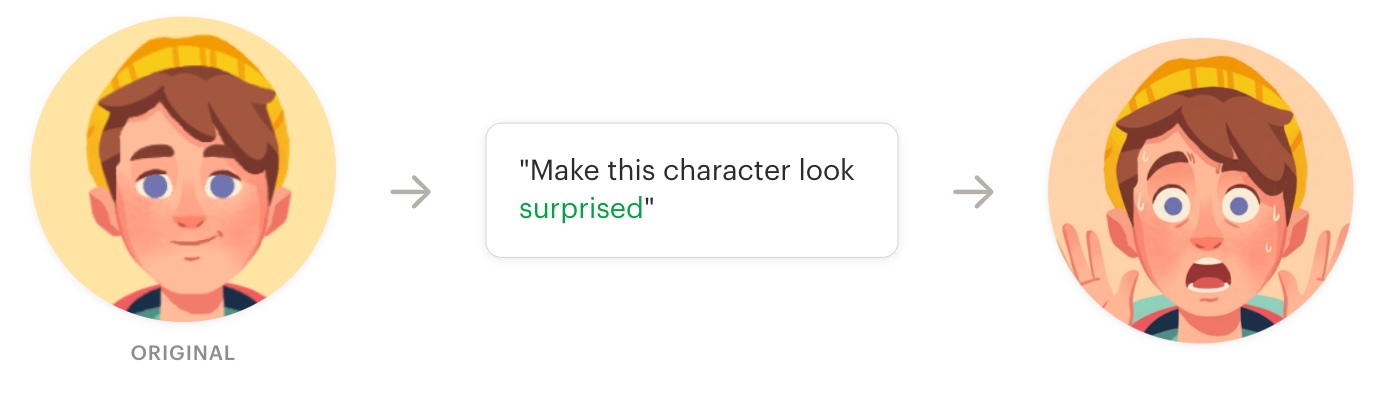
I mean… it’s not awful. It is surprised. But the hands, the sweat drops, the exaggerated cartoon eyes, the smoothed brushstrokes, the square-headed eyebrows - none of that was in the original. And every character I tried this on came back like this: a generic surprised face, in a generic 2D-illustration style, regardless of what the source looked like.
Head-category collapse (aka, “Disneyfication”)
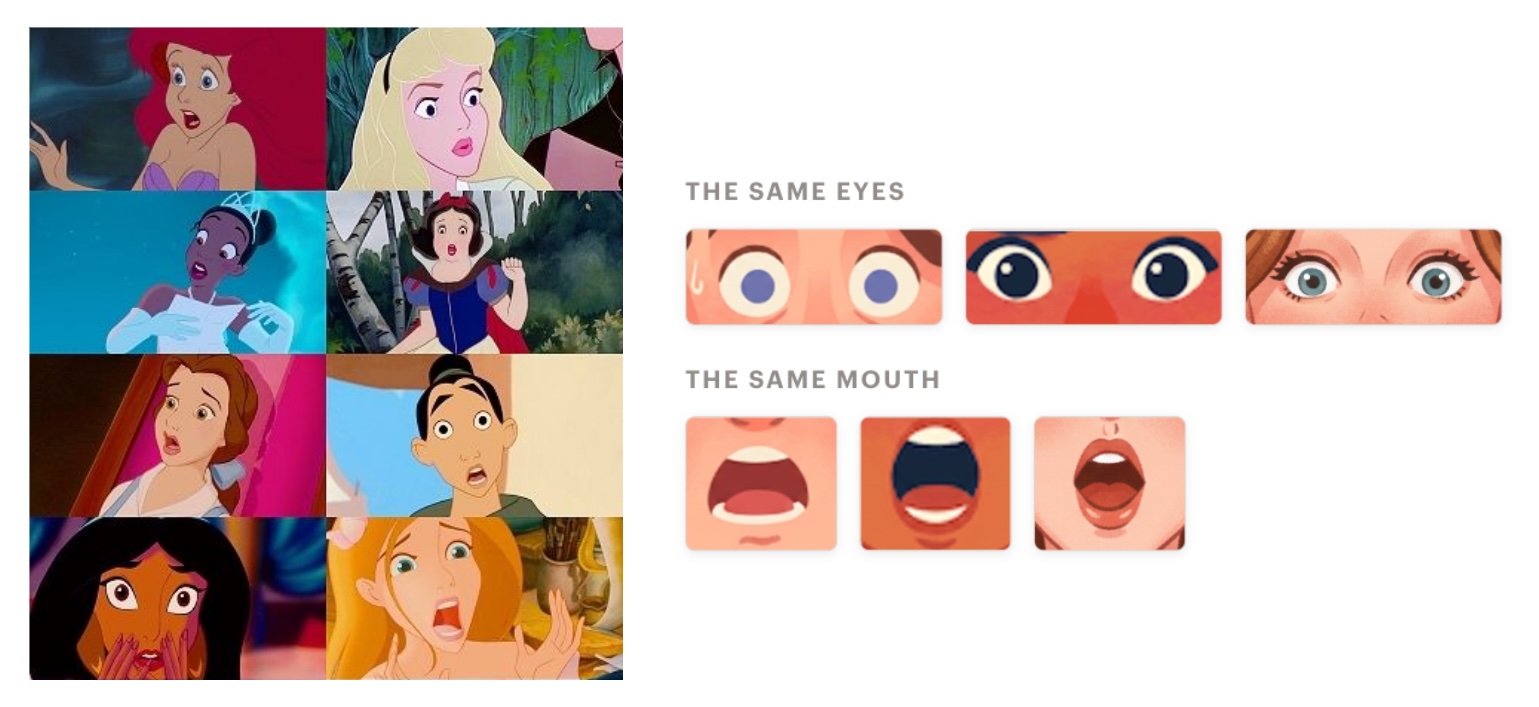
The name for this in the literature is head-category collapse (LTB-Solver, 2025). Even though the model has seen millions of variations of “a surprised 2D character”, outputs collapse into a narrow band of average versions. Zhang et al. (2023) describe the editing-specific version as contextual prior bias: the change you wanted comes bundled with a free package of changes you didn’t. A useful number from Samuel et al. (2023): diffusion models fall off a cliff for concepts they’ve seen fewer than ~10,000 times in training. Our characters are drawn in-house by two artists; effectively zero examples in any training set.
I’ve named this particular flavour Disneyfication: the model defaults to the average 2D cartoon illustration face - wide eyes, soft gradients, generic open mouth - and we get back something that looks like a Disney version of the original. Brushstrokes smooth into clean vector lines, flat fills drift into soft gradients, edited features come back as cartoon-princess equivalents.
The reframe
The single most important shift in this project: this is not a generation problem, it’s an editing problem. We’re not asking the model to draw a surprised character. We’re asking it to take a finished illustration and modify the smallest possible patch of pixels so the expression reads differently, while leaving everything else - brushstrokes, intentional imperfections, flat fills, line weight, palette - exactly as the artist drew it.
That distinction sounds pedantic, but it changes every architectural and prompting decision downstream. Generation rewards the model for inventing detail; with editing, any stylistic change to the original means the model has done the wrong thing.
Three principles emerged from this work - verified on Nano Banana 2 editing Stile illustrations, but rooted in cross-attention and VAE behaviour that should generalise to other diffusion-based editing setups. I’ll go through each in turn, how we discovered them, and the research that backs them up.
1. Say less to preserve more
The more you describe in the prompt, the less faithfully the model preserves the reference.
The cause sits inside cross-attention, the part of a diffusion model that lets text tokens “vote” on what every region of the image should look like at each denoising step. Every style word in your prompt is an active conditioning signal - a handle cross-attention can use to re-render the patch it describes - not a request to leave existing detail alone. So every “thin clean linework”, every hex code, every “soft skin gradient” you helpfully include gives the model another reason to redraw the region it names. The corollary in the editing literature: methods like StyleDiffusion (Li et al., 2023) and LAMS-Edit (Fu & Okatani, 2026) preserve structure precisely by changing as few prompt tokens as possible relative to the source and constraining attention away from unedited regions. Minimal, source-aligned prompts preserve more.
Exhibit A: the design fingerprint
We tried using an LLM to extract a detailed JSON “style fingerprint” from each illustration - feature descriptions, linework, palette hex codes, highlight and shadow treatments - and inject it into every edit prompt. Hypothesis: vague preservation language gives the model too much latitude, so making the style explicit should constrain it.
Loading diagram...
Two text-LLM passes turn the original into character-specific edit prompts, which then drive a parallel image-edit + recombine pass.
Outcome: the outputs were noticeably worse. More re-rendering, more highlight shifts, more line reinterpretation. The fingerprint forced the model to reconstruct the image to match the fingerprint, instead of just leaving it alone. The pipeline was also expensive - two extra LLM calls per edit, plus a much heavier prompt going to the image model, which slowed generation noticeably.
Here’s the pipeline running on one of our characters:
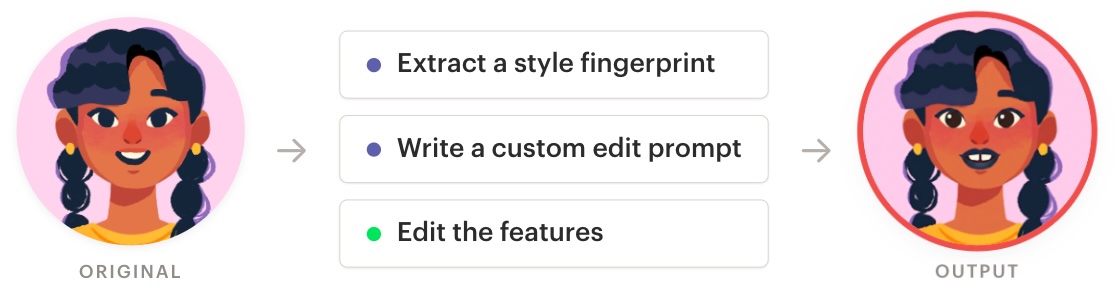
The recombine step here uses the same production prompt we ship; only the per-feature edits were fingerprint-driven. The output doesn’t really land on “surprised” - the eyes have been reinterpreted, and the mouth has two oversized square teeth where the original has a row of small ones.
The failure mode makes sense once you look at what we were asking the pipeline to do. We were using text to quantify things that don’t really live in text - palette nuance, line texture, the soft falloff on a shadow - then handing those descriptions back to an image model and asking it to reconstruct the original from words. That round-trip is fundamentally lossy. Worse, it’s not how image models reason about images in the first place. They don’t read “warm ochre with a 2px line weight”; they “think” in features and embeddings - layered patterns, shapes, and textures rather than the nameable design attributes a human reviewer would reach for. Compressing a reference down to a paragraph of adjectives and asking the model to re-expand it throws away the exact signal the reference was supposed to provide.
The teeth are the lossy round-trip caught in the act. The fingerprint described the source as having “two distinct, square-ish, bright white front teeth, separated by a dark line” - a confident hallucination. At that resolution there aren’t enough pixels per tooth for the VLM to see anything specific, so it fell back on what it “expects” a smile to look like. Speculatively, bias in the training data may sharpen that fallback: the source character is a girl of colour, and “square-ish, bright white teeth separated by a dark line” is the cartoon-smile default of an over-represented demographic. That fabricated detail got written into the edit prompt, and the image model rendered it faithfully - the damage was done the moment we let AI-generated text descriptions stand in for the reference itself.
Exhibit B: negation doesn’t work
Naming an attribute you don’t want is unreliable, and can make that attribute more likely to appear, not less. Alhamoud et al. (2025) benchmark vision-language models on negation and find they perform at near-chance level: phrases like “not wearing glasses” are not signals these models read the way humans do. VSF (Guo & Du, 2025) gives a clean concrete instance for image generation: a prompt for “a scientist that is not wearing glasses” generates a scientist with glasses more often than “a scientist” would. Both findings are on CLIP-style text encoders and standard diffusion stacks; Nano Banana 2’s text-conditioning isn’t publicly documented, so treat this as a well-evidenced general property of current text-to-image systems that you’d expect to carry over, rather than a measured fact about this model.
Here’s a representative run, with a heavily negated prompt:
Edit this character to look surprised.
Do NOT add iris glare or eye highlights that are not in the original. Do NOT change the eyebrow colour, thickness, or shape. Do NOT smooth or redraw the linework. Do NOT add shading, gradients, or rendering details that are not in the original. Do NOT change the skin tone, lip colour, or hair. Do NOT change the background, clothing, or head shape.
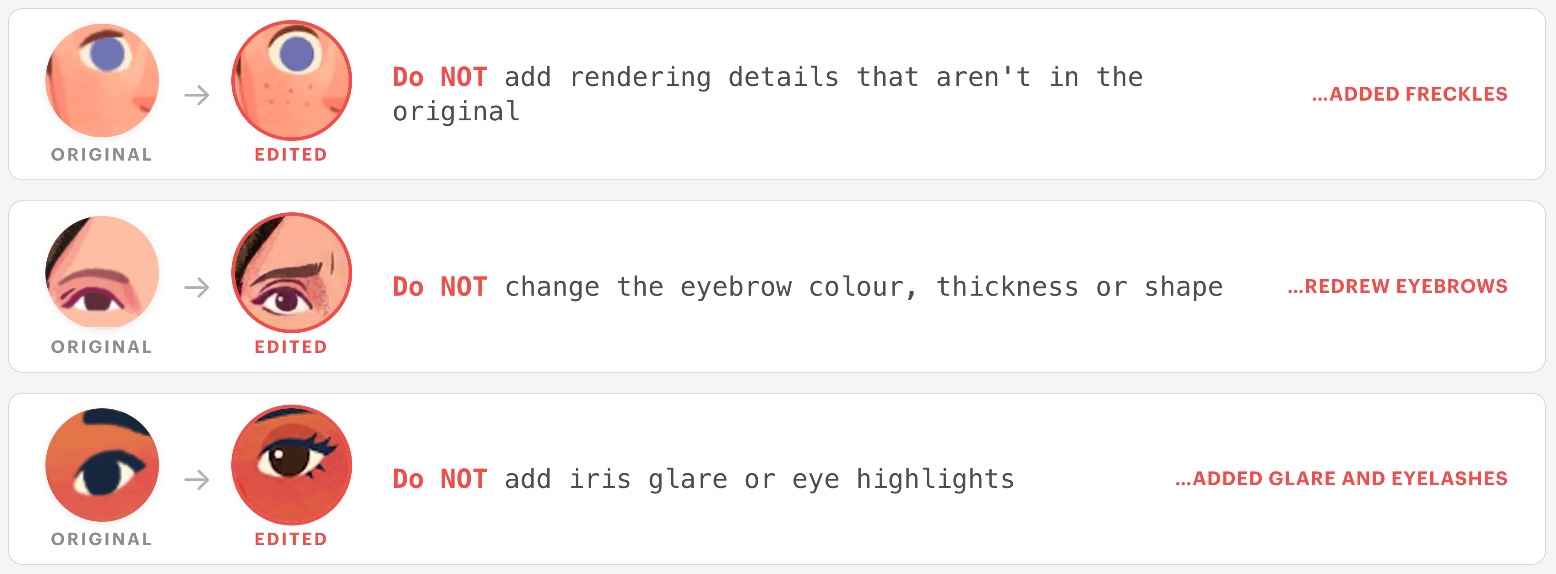
The prompt forbids changes to “skin tone” and forbids “shading, gradients, or rendering details that are not in the original” - and the model added freckles, which are exactly that: rendering detail on the skin that wasn’t in the source. Naming those things appears to have focused cross-attention onto the skin surface, and once it was attending there it wrote new detail rather than leaving it alone. The negation didn’t suppress the behaviour; if anything it helped drive it.
We saw the same pattern across the rest of the character set. The model was especially fond of adding iris glare: the single “Do NOT add iris glare or eye highlights” line correlated strongly with painted-in glare that had never been in the original. Dropping the negative list in favour of neutral preservation language (“keep the original style and level of detail exactly”) consistently produced cleaner edits. We didn’t run a controlled ablation, so this is a strong tendency rather than a measured law - but it lines up cleanly with the negation literature above.
Why LLMs don’t have this problem
Text LLMs handle negation fine - “John is not a doctor” doesn’t get next-token-completed as if John were a doctor - because next-token prediction is sensitive to word order, and “not” massively changes what should come next. Image models have none of that pressure baked in. The text encoder learns to match captions to images, not to model sentence structure, so “a scientist” and “a scientist not wearing glasses” look almost identical to it. Training captions describe what’s in the picture, never what isn’t - there are no images of “a kitchen with no elephant” - so the model never learns what the absence of something looks like. And the generation step itself (classifier-free guidance) works by amplifying whatever text is in the prompt, so “do NOT add freckles” actually pushes “freckles” harder into the output, not away from it. Modern multimodal models like Nano Banana 2 probably use LLM-grade text encoders, which softens the first weakness - but the other two still hold, and Nano Banana 2 doesn’t even expose a negative-prompt field to bolt on the usual workaround.
Summary
When a reference image is supplied, style should be preserved implicitly. Describing it explicitly - even negatively - increases reconstruction risk. In other words: never name the thing you don’t want.
2. Describe movements, not appearances
Early prompts described what the result should look like, e.g. “arrange the mouth into a small oval opening”. Switching to describing what should happen - “drop the jaw to open the mouth” - gave consistently better results.
I have a few theories for why this works. First, action language taps the model’s kinematic priors: it has seen vast amounts of faces in motion, and can resolve “drop the jaw” in whatever style the reference already establishes. A target shape like “oval mouth opening” has no comparable facial-expression prior to anchor on, so its interpretation varies across characters; it also carries a few more style-laden tokens, adding takeaway 1’s reconstruction pressure on top. MagicFace (2025) offers indirect support for this theory - it conditions facial expression edits on an anatomical vocabulary of facial motion (e.g. “jaw drop”), showing that motion-grounded representations are robust signals for image editing tasks.
Second, action prompts trigger useful side effects: a kinematic instruction in one region can propagate to adjacent features in the character’s existing style, sparing you a separate edit there.
Exhibit A: describing actions beats shape prompting
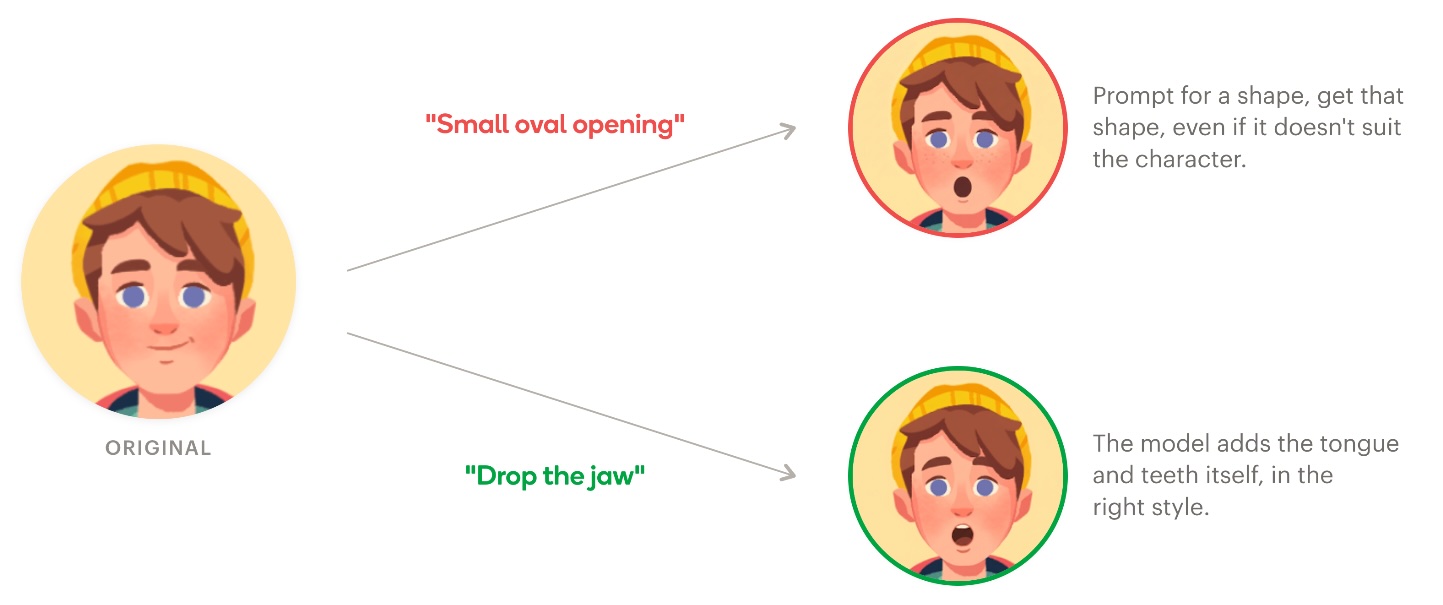
For the surprised expression, we initially asked the model to “open the mouth into a small oval shape”. The intended result was a shocked open mouth, but outputs varied wildly across characters - some came out with weird parted lips that didn’t read as surprised, others looked oddly pursed. Adding size qualifiers like “large oval mouth opening” sometimes made things worse, with a few characters ending up with mouths that looked ridiculous. Switching to a kinematic prompt - “drop the jaw to open the mouth into a gaping shape” - used fewer words, said less about the target shape, and produced consistently surprised-looking results across the whole character set. Palos (2024) finds that scope limitation, not verbosity, is what reduces hallucinated content in generative models - a useful framing for why a less-specific prompt can outperform a more-specific one.
Exhibit B: action prompts move adjacent features for free
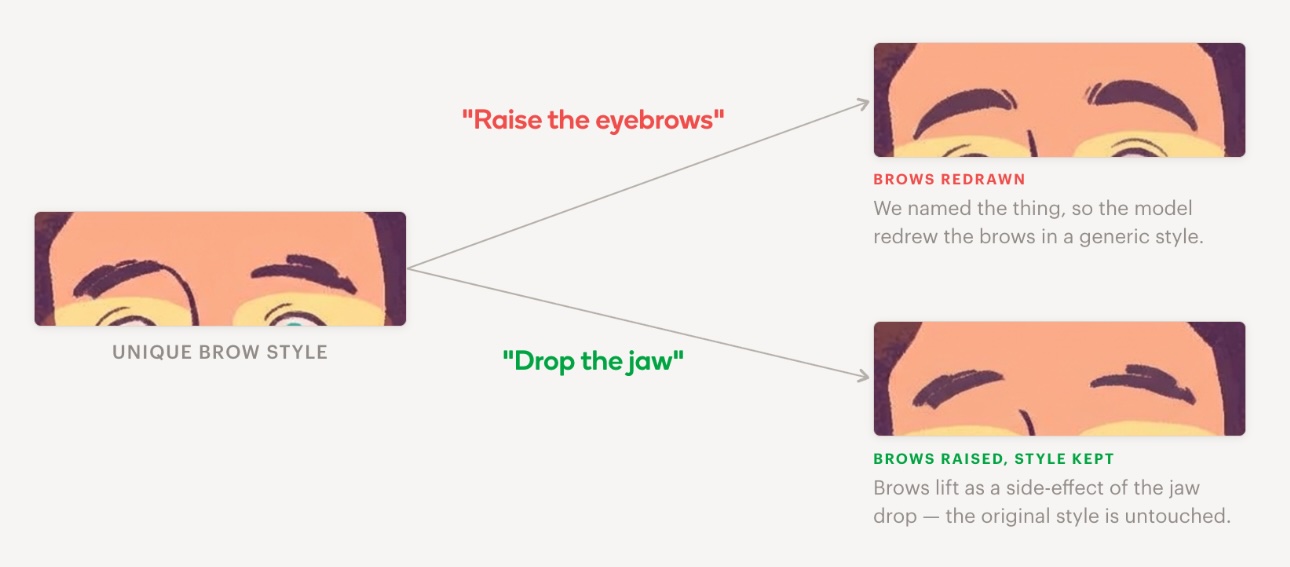
Eyebrow edits were where the worst style damage came from in our pipeline. Asking the model to “raise the eyebrows” almost always changed something - colour, thickness, line weight, shape. Then we noticed: a “drop the jaw” prompt, with no mention of brows at all, lifted them as a natural consequence of a surprised expression - in the character’s existing brow style. We deleted the explicit eyebrow step from the pipeline.
Summary
Two valuable lessons learned here:
- Describe causes, not effects.
- Don’t edit features you can get as a side effect of editing something else.
3. Parallel edits beat sequential chains
Don’t chain edits. Run each one against the pristine original, then merge them in a single recombination pass.
Exhibit A: chained edits drift past the point of recovery
The first pipeline chained the feature edits - eyebrows, eyes, mouth, brow crease - each step taking the previous output as input, with no reference back to the original. By the final step the image had drifted significantly: VAE round-trips had compounded across four encode-decode cycles, and the model had no way to see what had been lost. Each step looked like a perfectly reasonable edit of whatever it was just handed.
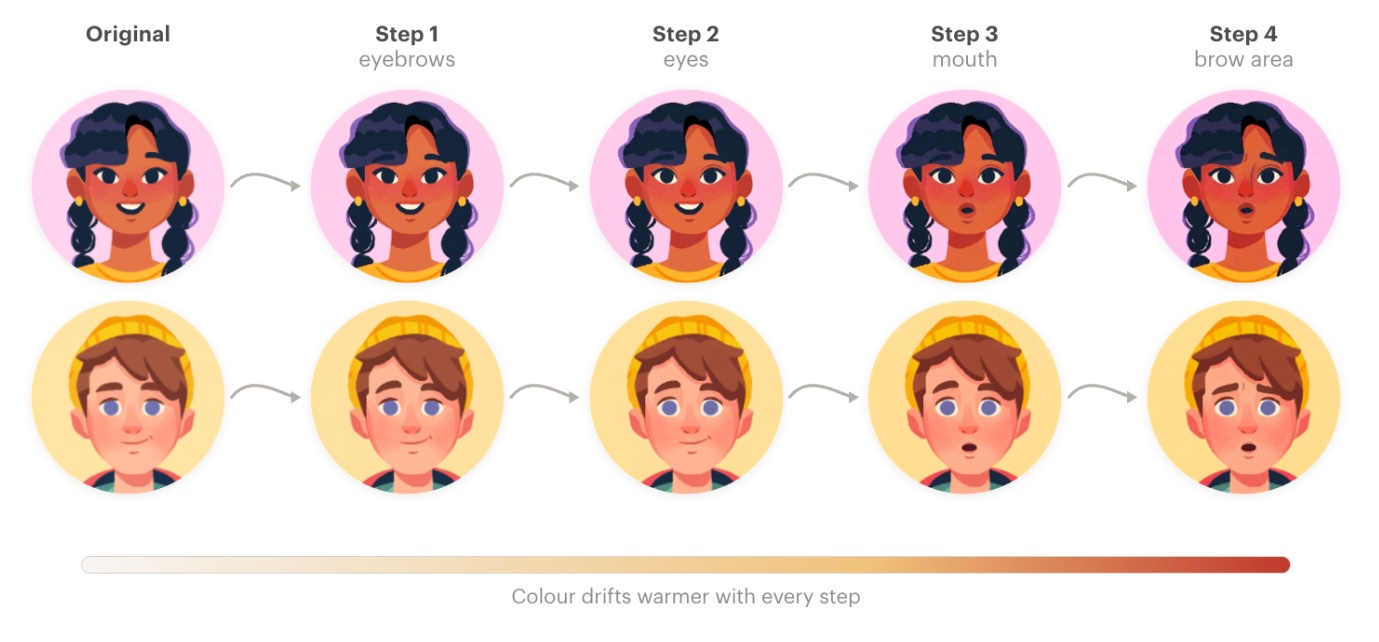
Watch the colour. Every step is warmer than the last; by step four the palette has shifted noticeably.
Loading diagram...
Naive chain. Every step inherits the drift of the previous one, with nothing steering the pipeline back toward the original.
The drift also has a direction - usually warm enough that Reddit nicknamed it “the piss filter” in early 2025, though the exact direction depends on the model and the subject.
This was the biggest single architectural lesson of the project. Every edit on a latent diffusion model is an encode → denoise → decode round-trip through a VAE (variational autoencoder, the network that compresses pixels into a smaller “latent” space the diffusion model can work in). VAEs aren’t perfectly invertible: each round-trip nudges colour statistics, blurs fine detail, and introduces small artefacts. REED-VAE (2025) shows this directly - repeated encode-decode cycles accumulate visible distortion, with palette shifts and detail loss compounding step over step.
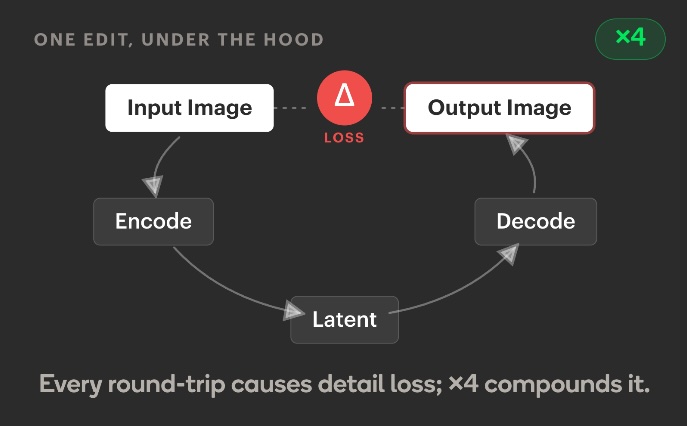
And this isn’t unique to our pipeline - the Image Editing with Diffusion Models survey (2025) calls drift a structural property of sequential edits, not a prompting failure.
The obvious fix, then, was to anchor every step to the pristine original as a reference image, and to add a mid-pipeline style-correction pass: after the first couple of edits, feed the drifted intermediate back through the model and ask it to restore the style before continuing. This did recover a lot of the drift - colour statistics and texture frequency snapped back close to the original, and outputs were usable more often than not. But it wasn’t reliable. The correction is itself another encode → denoise → decode round-trip - more VAE losses on top of the existing ones - and it can’t recover fine linework or palette anchors that earlier passes have already thrown away. The most consistent path to style preservation was the one with the fewest round-trips: as few edits as possible, run in parallel.
Exhibit B: fewer edits, run in parallel from pristine
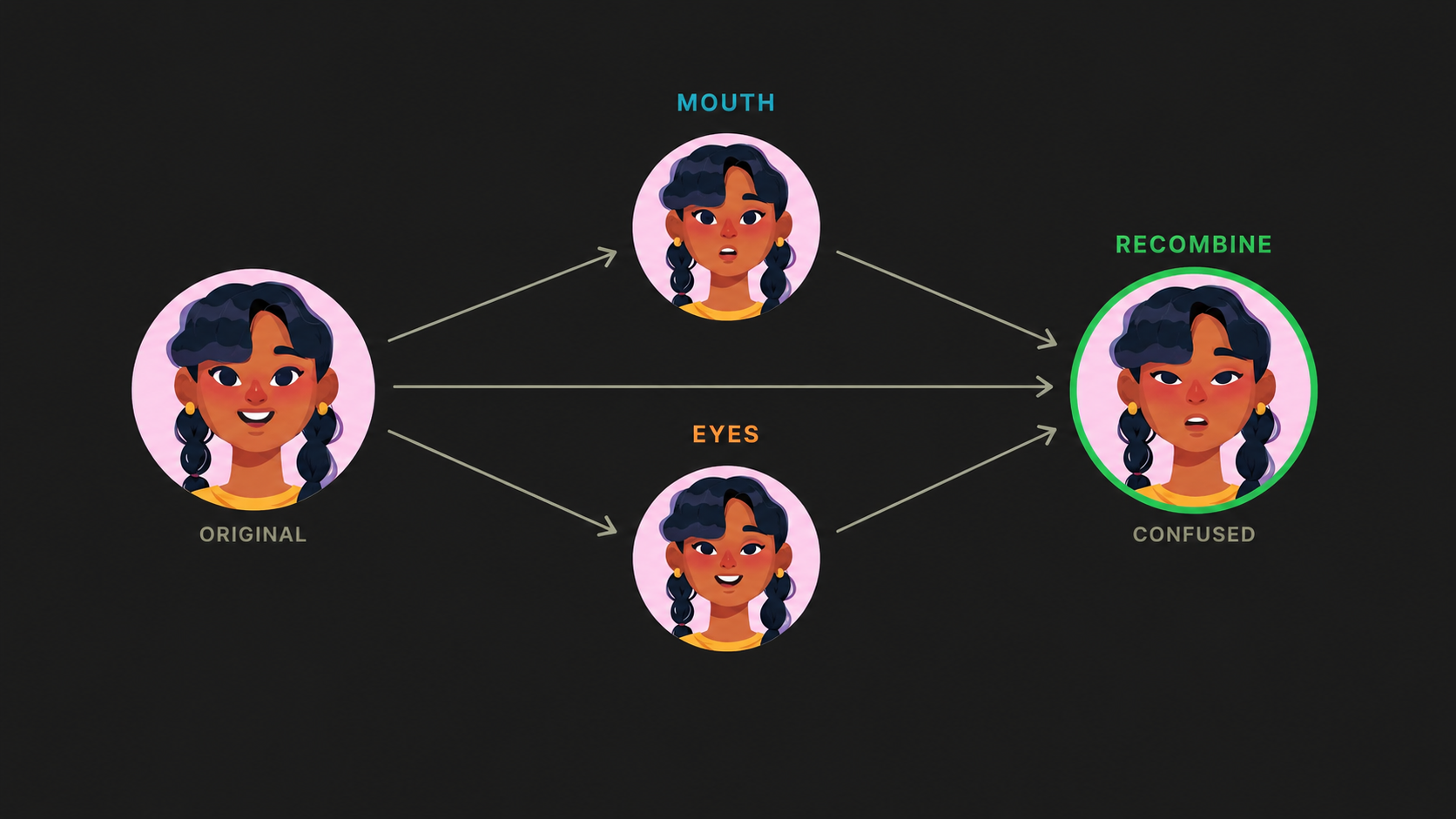
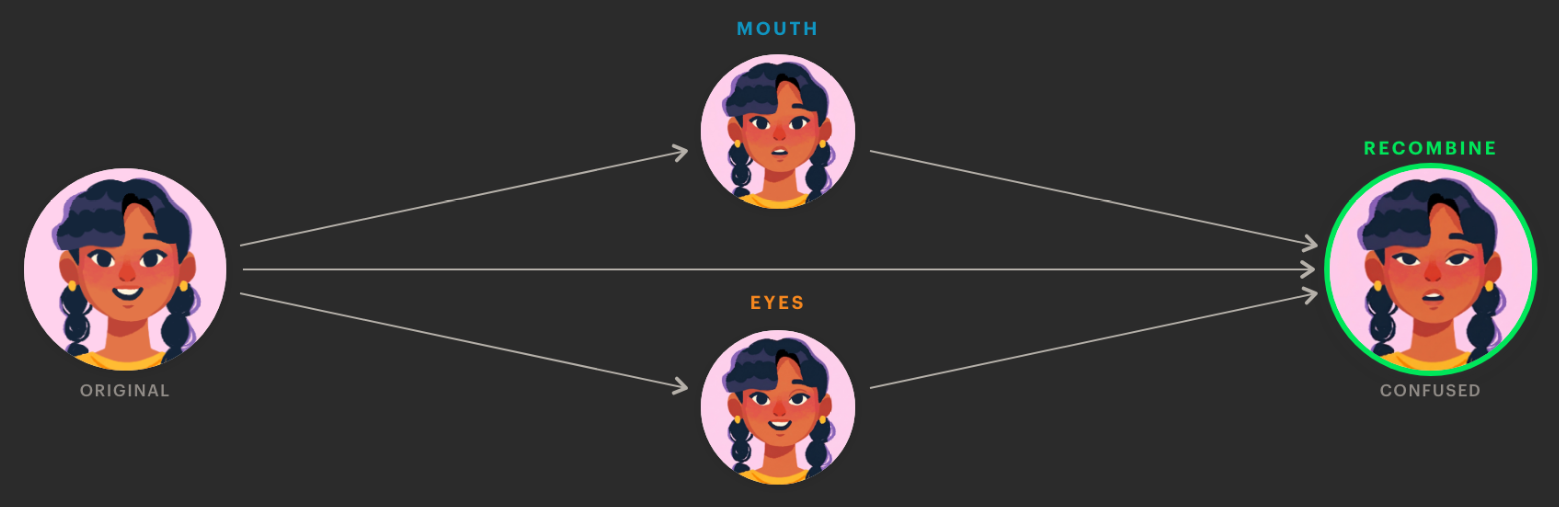
The fix had two parts. First, drop redundant edits. The chained Shocked Face pipeline edited eyebrows, eyes, mouth, and a brow crease - four features. Once we’d internalised takeaway 2 (movement-based prompts trigger useful side effects), we noticed that “drop the jaw” lifted the eyebrows and pulled the brow crease in for free; we didn’t need explicit steps for either. Two real edits - eyes and mouth - produced the same expression as four. Second, run those edits independently against the original and merge them in a single recombination pass at the end.
Loading diagram...
Each feature edit runs against the pristine original; a single model-driven pass recombines them.
The recombination step is the only non-obvious part. We tried two approaches: pixel-space compositing with face-region masks, and asking the model itself to merge the edits (“take the eyes from image 2, the mouth from image 3, on top of image 1”). Pixel compositing was deterministic but couldn’t harmonise line continuity or shading across the seams. Model-driven recombination behaved like a neural compositor - seam-aware, shading-aware, and faithful when given low-entropy instructions. That’s what we shipped.
The shipped recombine prompt is mechanical on purpose: it names the inputs, says what to take from each, anchors the geometry, and leaves everything else alone. For a two-edit surprised expression (eyes from Image 2, mouth from Image 3), the substituted prompt looks like this:
I have an illustrated character avatar (Image 1, the original) and 2 edited versions of it. Each edited version changes one facial feature:
- Image 2: eyes edit
- Image 3: mouth edit
Produce a single image that applies ALL feature edits together on the original character. Take the eyes from Image 2. Take the mouth from Image 3. The eyes in the final image must be the exact same size and shape as in Image 2. The mouth in the final image must be the exact same size and shape as in Image 3. Keep everything else exactly as it appears in the original image. Maintain the exact art style, colours, and line weight.
No style description, no per-character tuning, no negative-prompt grab-bag. The size-anchoring lines are the only non-obvious addition: without them, the recombiner occasionally rescaled features (a small mouth ballooning to fill the space a neutral mouth had left behind, or eyes coming back fractionally larger than the edit branch produced). With those lines in place, the recombiner became boring and predictable, which is what we wanted.
Summary
- Drift can’t compound. Every edit branch sees the original. The worst case is one round-trip per feature, not three or four stacked.
- Style correction becomes unnecessary. The reference image is always the input. There’s nothing to “correct back to” - we never left.
- It’s much faster. The Shocked Face pipeline went from six sequential calls (~43s) to two parallel calls plus a recombine (~14s) - about 3x wall-clock, with fewer API calls overall. The ratio holds as features are added: cost is one edit plus a recombine, regardless of how many features change.
Non-human characters: the inversion
A lot of Stile’s character library is non-human - anthropomorphised planets, viruses, organs, weather systems. For these, the feature-decomposition pipeline falls apart (there’s no “drop the jaw” on a black hole). But it turns out you don’t need it: one-shot prompt-only editing just works. “Make this character look surprised” applied directly to the original, no decomposition, and the model usually nails it while preserving the style.
Why: head-category collapse requires a populated head category to collapse toward. For “surprised woman” the prior is dense - the model has seen the centroid of that category millions of times and pulls hard toward it, drowning out the reference. For “surprised black hole” or “concerned mitochondrion” there’s no centroid; the category is exactly the sparse, sub-10,000-examples regime Samuel et al. flag as a generation cliff.
With no strong prior competing for cross-attention, the reference image becomes the dominant signal by default - the model’s lack of a relevant prior was the feature, not the bug. Disneyfication never gets a foothold because there’s no Disney equivalent to collapse toward. RAVEL (2024) treats rare-concept and common-concept editing as separate problems with different solutions, which lines up with what we shipped: kinematic decomposition for humans, single-prompt one-shot for everything else.
How we evaluated this
Every iteration produced a grid of outputs across characters and emotions, reviewed in two passes. First pass: do the edited features actually read as the intended emotion against the original, and do they still look like they belong to that character? Second pass: did anything else move - colour, brushwork, line weight, or palette drift across the set? The design team did the same on the candidates they cared about, and their feedback was the gold standard - they can tell at a glance whether brushwork has been “smoothed” or a skin tone has shifted by a couple of points.
Judgement calls that take a few seconds are cheap at low volume, especially while we were still trying to get the shape of the system right - we needed eyes on every output to know whether a prompt change had actually helped. That obviously doesn’t scale. The next step is an automated drift evaluator: embedding-based similarity on non-face regions, histogram checks for palette drift, an LLM judge for emotion adherence. Future work.
Open issues
- Iris glare and pupil definition sneak in occasionally regardless of prompt. General preservation language reduced it; it didn’t eliminate it. A mask-based post-processing step is probably the long-term fix.
- Some characters’ edits are more successful than others. We use the same hand-picked prompt set for every expression across the whole character library, and the characters look slightly different from each other - so while the prompts generalise well across the set, they aren’t optimal for any single character. Per-character tuning would close the gap, but a generalist pipeline beats hand-tuning prompts per character.
- The brow-raise is accidental. We rely on “widen the eyes” or “drop the jaw” to incidentally lift the brows. The exact step that produces the lift differs per character. A future prompt change could quietly kill the side effect.
- Evaluation is still manual. Needs to be automated before this scales much further.
How we’re using this at Stile
Internally, we’ve been experimenting with embedding expression editing into our character conversations. The end-to-end pipeline:
- An LLM classifies each speech bubble’s text into an emotion (surprised, concerned, excited, sad, neutral, …).
- A vision classifier determines whether the avatar is a human character. Human avatars go through parallel feature edits and a recombine pass; non-human avatars take the one-shot path described above.
- Results are cached by (avatar, emotion), so repeated uses cost a single lookup.
Loading diagram...
Full production pipeline. The expensive image steps run at most once per (avatar, emotion) pair across the platform’s lifetime; once cached, the widget just classifies text and fetches the right pre-generated variant - fast, deterministic, cheap at runtime.
This is currently being experimented with by the design and content teams, and is not yet released to customers.
What’s next
Once we trust the evaluation enough to drop the human-in-the-loop step, the same pipeline opens up:
- Multiple orientations of the same character from a single front-facing reference
- Pose variation for characters that currently exist only as static headshots
- Lighting and palette variants for different lesson contexts (day/night, indoor/outdoor)
The general pattern - reference image plus minimal-delta prompt to produce a controlled variant - is broader than expression editing. Anywhere a designer would currently hand-draw a small variation of an existing asset is a candidate.
Conclusion
For stylised-illustration editing with a strong reference image, a frontier image model and a carefully restrained prompt outperformed every more-complicated approach we tried. The three principles - say less to preserve more, describe movements not appearances, parallel edits beat sequential chains - are all downstream of one shift in framing: treating this as editing, not generation. Once that lands, most of the architectural decisions follow.
The surprising part wasn’t that the simple approach worked. It’s that the obvious moves - LoRA, ControlNet, inpainting masks, detailed style descriptions, negative prompts - actively made things worse. No ControlNet, no inpainting, and no LoRA needed!